A Tinyblog about Tinygrad
Tinygrad is a deep learning framework with an autograd engine and a compiler that targets many backend architectures: Nvidia GPUs, AMD GPUs, CPU, Apple Metal, WebGPU, Qualcomm GPUs (integrated graphics, for mobile and automotive) etc.
It tries to be a simple, hackable framework that gives you performant code for every architecture (doesn’t everyone?). Their focus is on keeping the core compiler simple, maintaining a relatively small number of operations, being lazy-first and performance oriented.
If I had to guess how George Hotz pitches Tinygrad to CEOs of AI accelerator companies, I believe it sounds something like this: “Tinygrad will give you better performance for your custom architecture than whatever you can build inhouse”. And he seems to be right in some cases, most notably for AMD GPUs.
Why care about Tinygrad?
This is my take on why it is worth understanding how Tinygrad works. There are many deep learning compilers out there: TVM, XLA/OpenXLA, TorchInductor, Luminal and many hardware-specific MLIR-based compilers. So why care about Tinygrad?
Firstly, Tinygrad has almost no third party dependencies. The core compiler has virtually no real dependencies and the only python packages you install are for testing. I will repeat that: They have no external dependencies for core compiler! This is a feat very few projects can brag about. This means that if you find a bug, chances are you can fix it in the compiler itself. It also means that there is virtually no risk of supply chain attacks, which unfortunately became more frequent recently with AI.
Secondly, they are the go-to way to get performant models for AMD GPUs. AMD is the biggest NVIDIA competitor with GPU accelerators. The GPUs themselves are very competitive, but the lack of software stack to unlock the AMD GPUs is what keeps their stock from skyrocketing. Tinygrad is trying to change that.
Lastly, the level of observability and the simplicity of logging in Tinygrad is incredible. Starting from the ease of viewing what you want: You just set the environment variable DEBUG=<num> and all the logs are managed by this one variable. This is mostly thanks to the absence of dependencies. Additionally, you can set VIZ=1 and it shows you a visual overview of all stages of the graph IR in the html-based report.
Feel convinced that this blog is worth your time? Good, let’s start.
What does this blog cover?
This blog goes in depth to explain the details of running Tinygrad compiler for inference and discusses trade-offs that Tinygrad made along the way. What this blog does not cover is model training and multidevice inference. Current focus is single device inference workloads.
Architecture
In this section we will do a deep dive into Tinygrad’s compilation and runtime. It starts from the frontend API which is called Tensor, which is a Tinygrad analogy of torch frontend. Here you call “ops” that are internally just a composition of the UOp operation instruction set. It tries to have a similar API to torch.
UOp instruction set is Tinygrad’s core IR that has ~90 operations (UOp == μ ops). To put this number in perspective, PyTorch analogy would be Core Aten ops (~200). Moreover, the UOp IR is the only IR in the whole Tinygrad compiler. There is no lowering to a low-level IR. You edit the graph IR part by part to lower the level of abstraction.
Note: Even though the Core Aten ops in torch contain ~200 ops, torch originally starts with Aten ops (more than 2000 ops) which may or may not be lowered to core aten set, depending on torch backend, so lowering torch operations is a very nonlinear process.
Architecture overview
A high-level view of Tinygrad compilation and execution is shown in the image below.
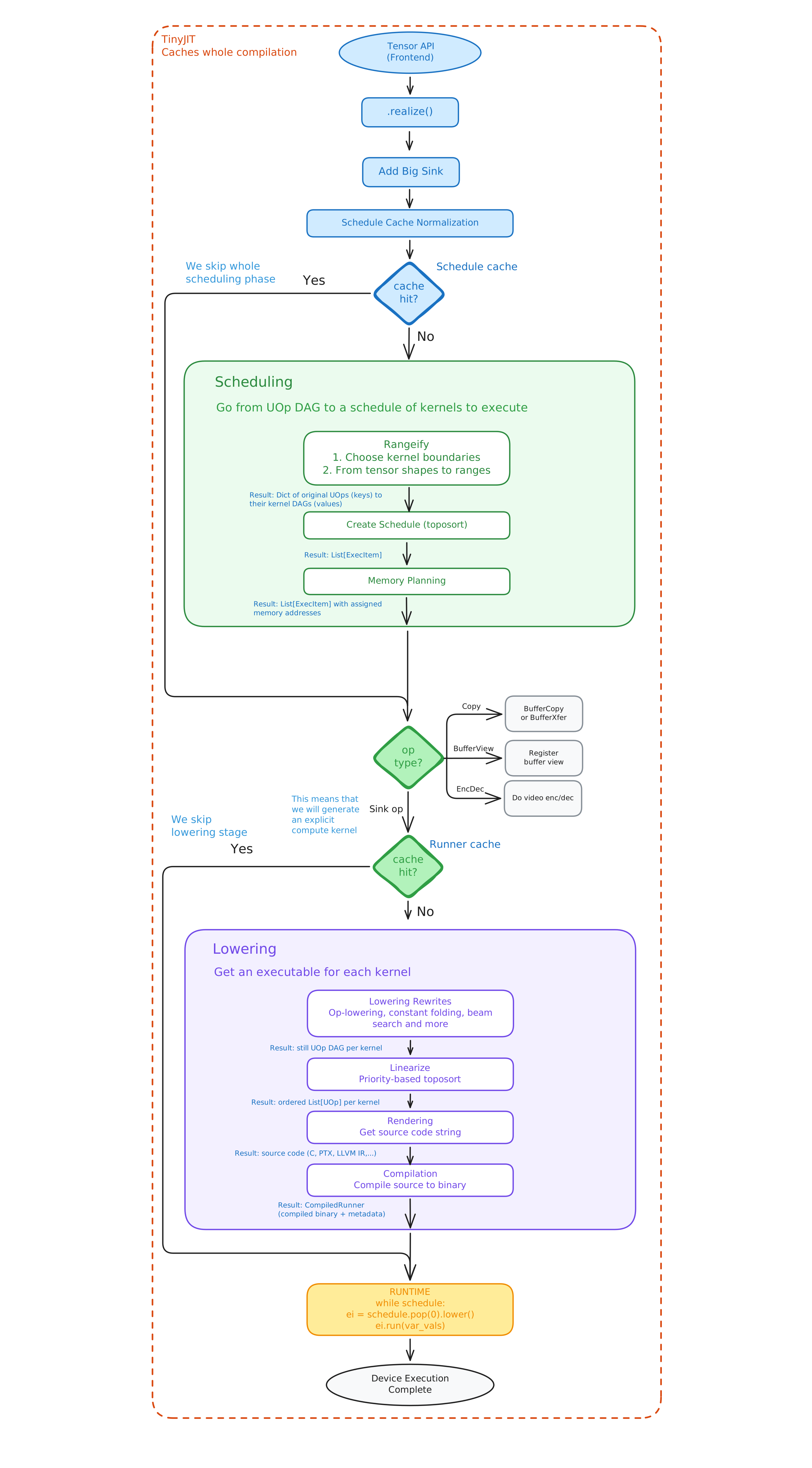
As seen, Tinygrad starts with realize method which triggers the compilation. The two biggest parts of the execution are scheduling and lowering. Roughly speaking, scheduling phase determines what kernels to execute and in what order (inter-kernel structure), while lowering determines what those kernels will look like for a target device (intra-kernel structure). Runtime takes in kernel boundaries as input and runs an interpreter-style while loop on all kernels that need to execute. Following sections will dive deep into each individual part of the Tinygrad compiler.
Realizing tensors
Compilation starts when realize method is called upon the tensor(s). Realizing a tensor means forcing the compiler to determine the value of that tensor. We don’t start compiling the graph until we need to - this is what it means that Tinygrad is a lazy-first compiler.
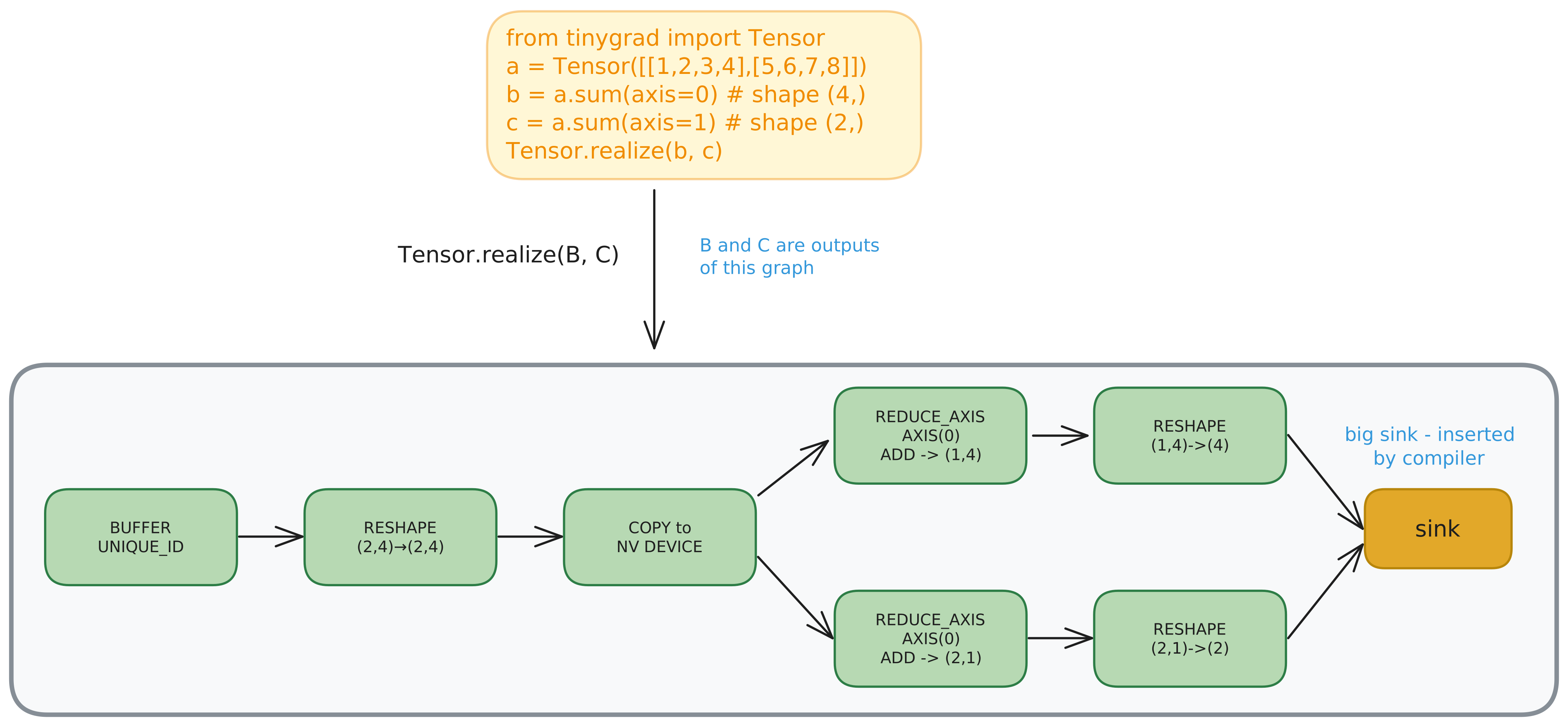
In the image above, you can see the core of the Tinygrad lazy-first approach. When you calculate B and C virtually nothing happens and operations just get captured, but not executed. It is only when realize method is called that all of its arguments trigger the actual graph compilation.
The first thing that happens is the insertion of the big sink operation that takes in any number of source ops/nodes and has no output. Big sink is the name for this particular sink node that collects all outputs. Having this single node as an output makes life easier - if you backtrack the operations from this single node, you are sure to pass through all of the nodes in a graph. That wouldn’t be the case in the graph above if, for example, we did backward on the Tensor B. In that case, branch C would be left unrealized.
Schedule Cache normalization
This pass tries to normalize the graph in a way that is independent of concrete values and only captures structure, which simplifies graph caching. That way, when we apply various rewrites to graphs, we can cache the graphs we’ve seen and skip the rewrites that we previously did. Normalization helps increase the cache hit rate.
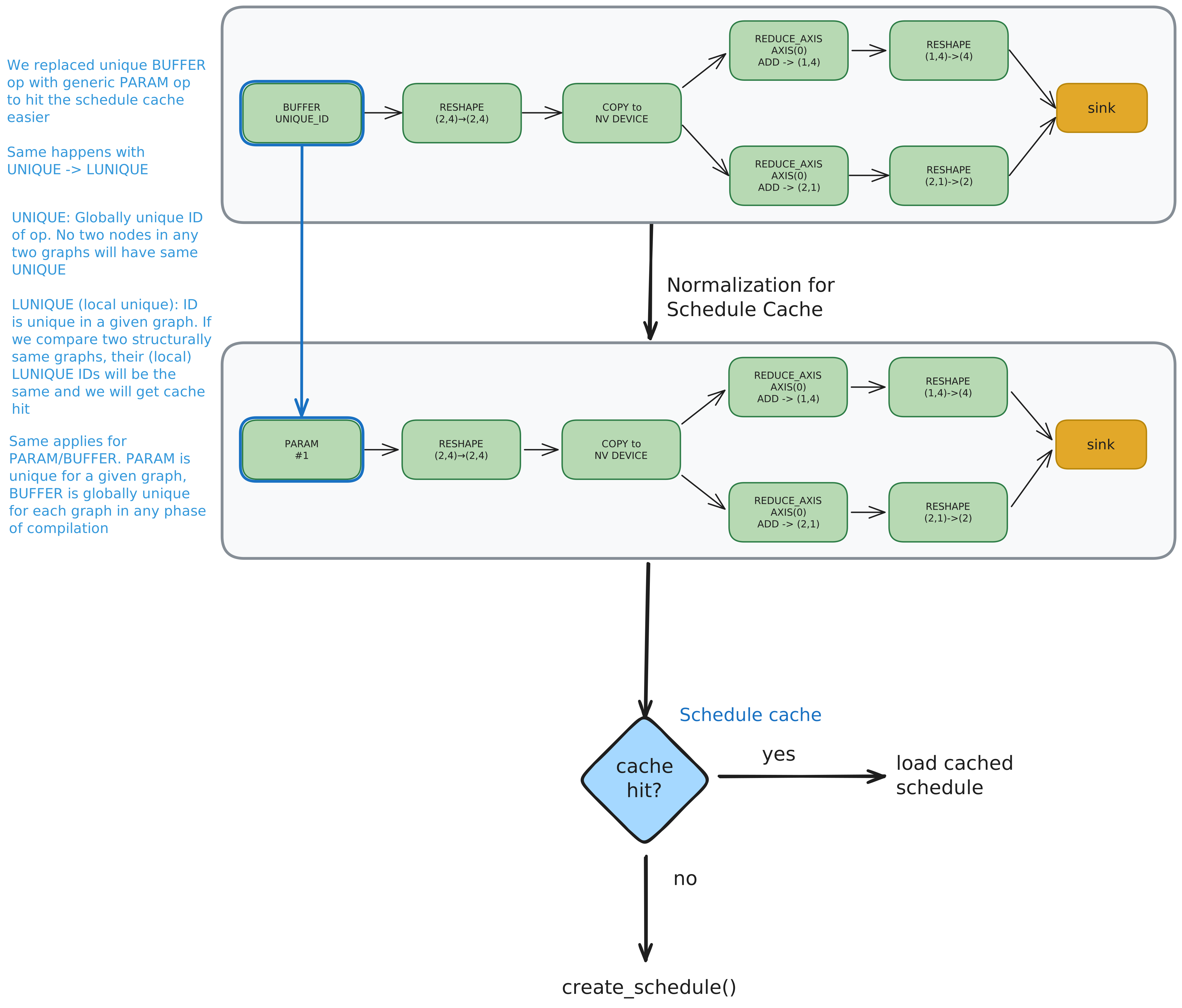
For example, buffer UOp with its details is replaced with the abstract param UOp. That way, any two params can be treated as structurally the same even if they represent different values. This simplifies the caching. Similarly, constants have their global UNIQUE identifier replaced with LUNIQUE - a local counter that starts from 0 for each different schedule invocation.
Note: Graph rewrite refers to any transformation that traverses the whole graph and applies a transformation in the format pattern -> rule. For example, we can add a label “important” to all of the nodes in the graph with 5 or more edges.
Rangeify
This is one of the most important phases in the compile process. It takes a UOp graph (represented by its big sink) and outputs a mapping for each UOp to its kernel graph replacement. The goal is to figure out which ops can be fused together and which can’t. If an op needs to be realized, that blocks the fusion over that op.
Ranges and Indexes
In order to understand rangeify phase we first must understand what exactly is a range. The following image tries to illustrate what it means to go from shape to a range.
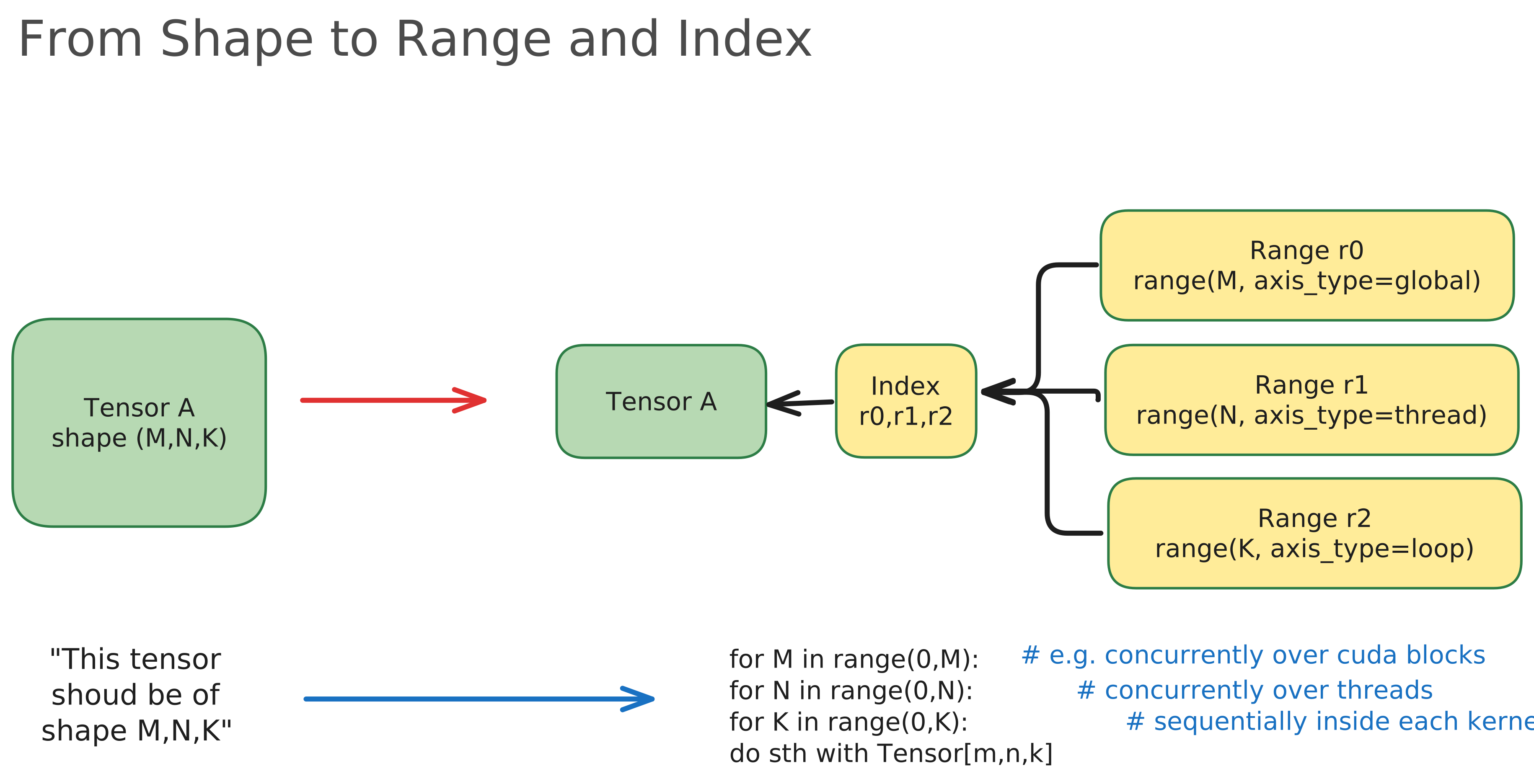
As seen in the image, shape can be viewed as a declarative property. It states a constraint that a given tensor must have some specific shape. On the other hand, range can be seen as an imperative property. It tells us exactly how our device should operate on a given tensor. For example, we could specify that we want to iterate over tensor’s first dimension on block-level, second dimension on thread level and so on. If Range op explains looping over one axis of a tensor, Index op groups different ranges to explain looping over a whole tensor.
Following sections discuss different rangeify passes.
1. Tagging ops
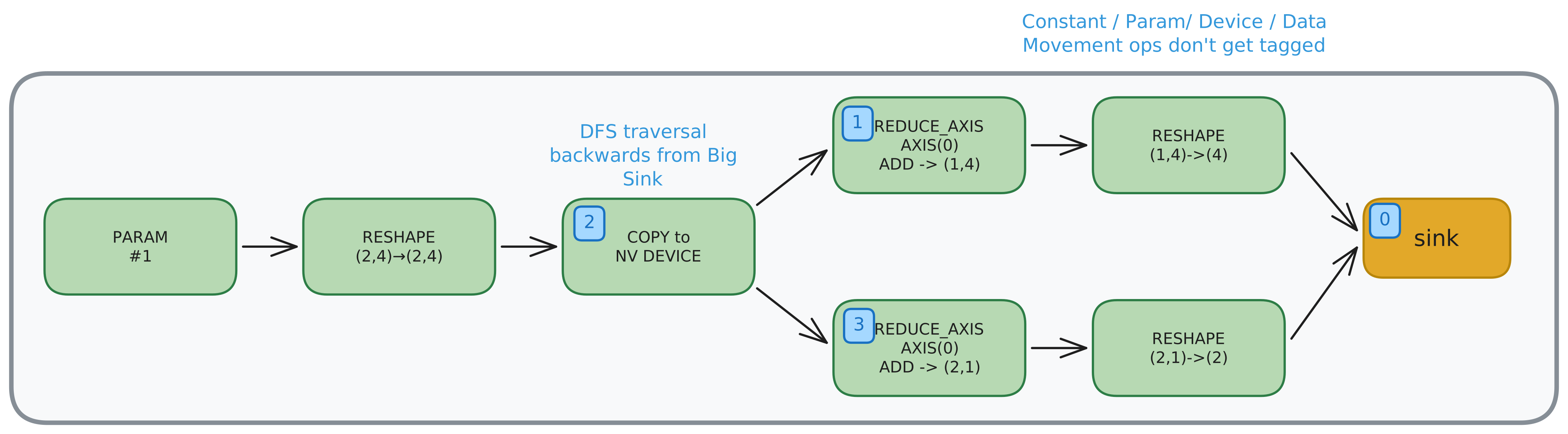
Ops are tagged starting from the big sink (tag=0) and going backwards in DFS order. Several ops are excluded from this: Param, Const, Device and Data Movement ops. These ops are just complements to the computation: Param/Const are references to values in memory, Device describes the device where computation is performed, and data movement ops impact the Ranges of tensors.
We use tags so we can reference the kernel that evaluates each tagged op from the original graph. Imagine a UOp graph that has tagged ops op1, op2, op3 and the graph gets rewritten so it contains ops call1 and call2. Call op is just a way of saying that we will explicitly compile and call this kernel in runtime. A result of rangeify pass might look something like this:
becomes_map = {
op1: call1,
op2: call1,
op3: call2
}
Where becomes_map maps the original tagged op to kernels that calculate them. In this example, op1 and op2 were fused into a single kernel call1, while op3 became part of the call2.
2. Building realize map
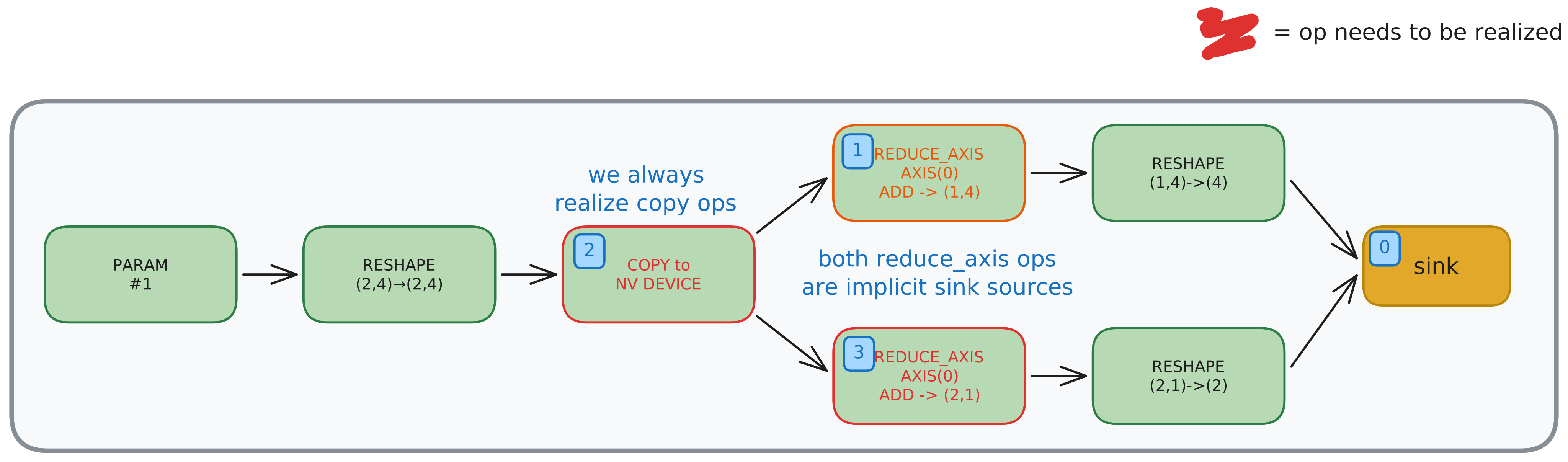
Realize map is a collection of operations that need to be realized. Realizing an operation means forcing the output of that operation to be calculated and stored to memory. These ops represent breaks in the op fusion as they require their outputs to be explicitly saved to memory. In this example, the first thing we need to realize are both reduce axis ops because they are indirect sources of the sink. We “pass through” data movement ops when looking for sink sources.
Also, we want to realize COPY operations, as they represent explicit memory copies. Copy op later decomposes to device2device, device2host or host2device mem copy. There are more ops that cause tensor realization such as CONTIGUOUS, ASSIGN, BUFFER_VIEW, STORE, ENCDEC, etc.
3. Core Rangeify pass
The main part of rangeify is focused on replacing shapes with ranges. It starts from the big sink in reverse topological order and propagates the ranges backwards with a specific set of rules.
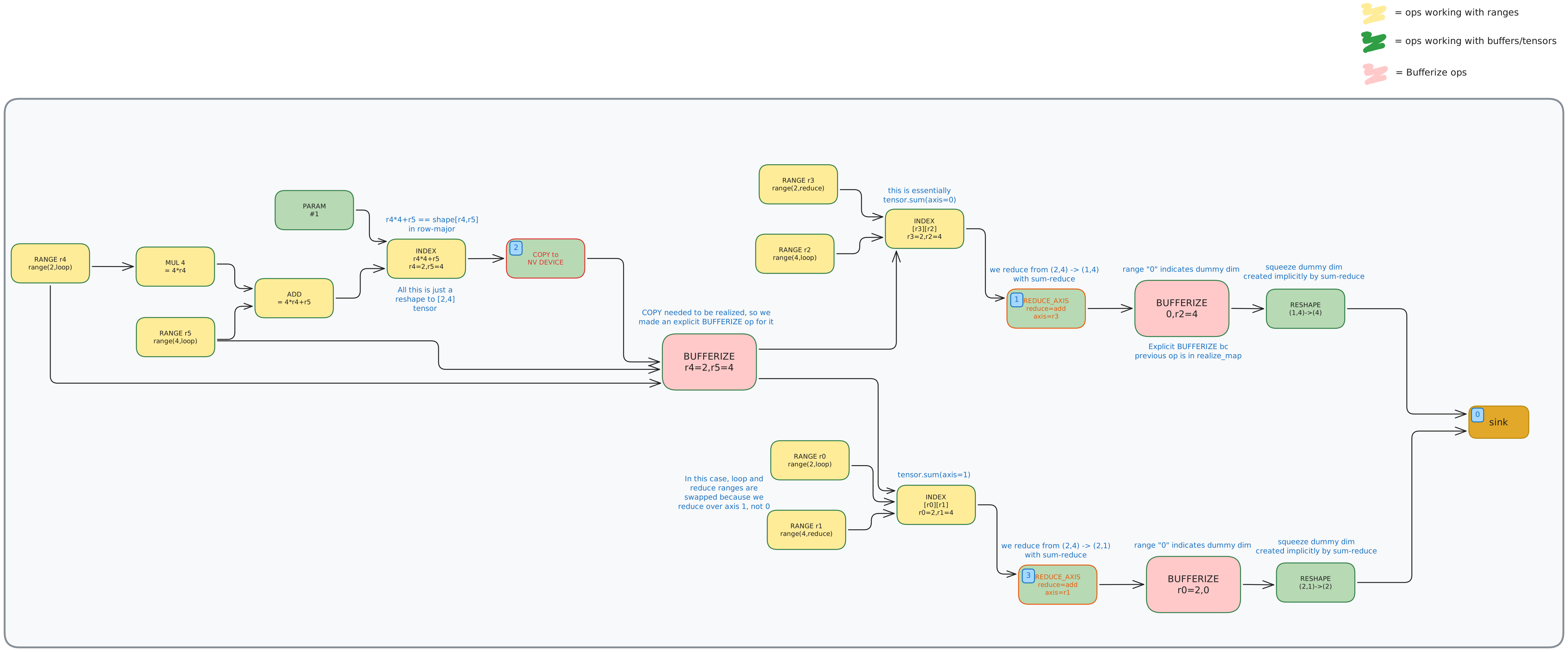
We can see that many things changed in this phase, so let’s discuss them one by one.
Firstly, we see some new Bufferize operations in the graph. They are added after each op that is marked for realization in realize_map. Bufferize op states that we will need an explicit buffer in memory to store this realized tensor. They are the constraint that interrupts fusing, since we cannot fuse two operations if we need to materialize the buffer between them.
Also, we see that each tagged op has a corresponding Index op. These are used to track ranges throughout the graph. Index and Range ops can therefore remove the need for explicit data movement ops.
Ranges are propagated from the op’s output ranges to its input ranges as seen in the image.
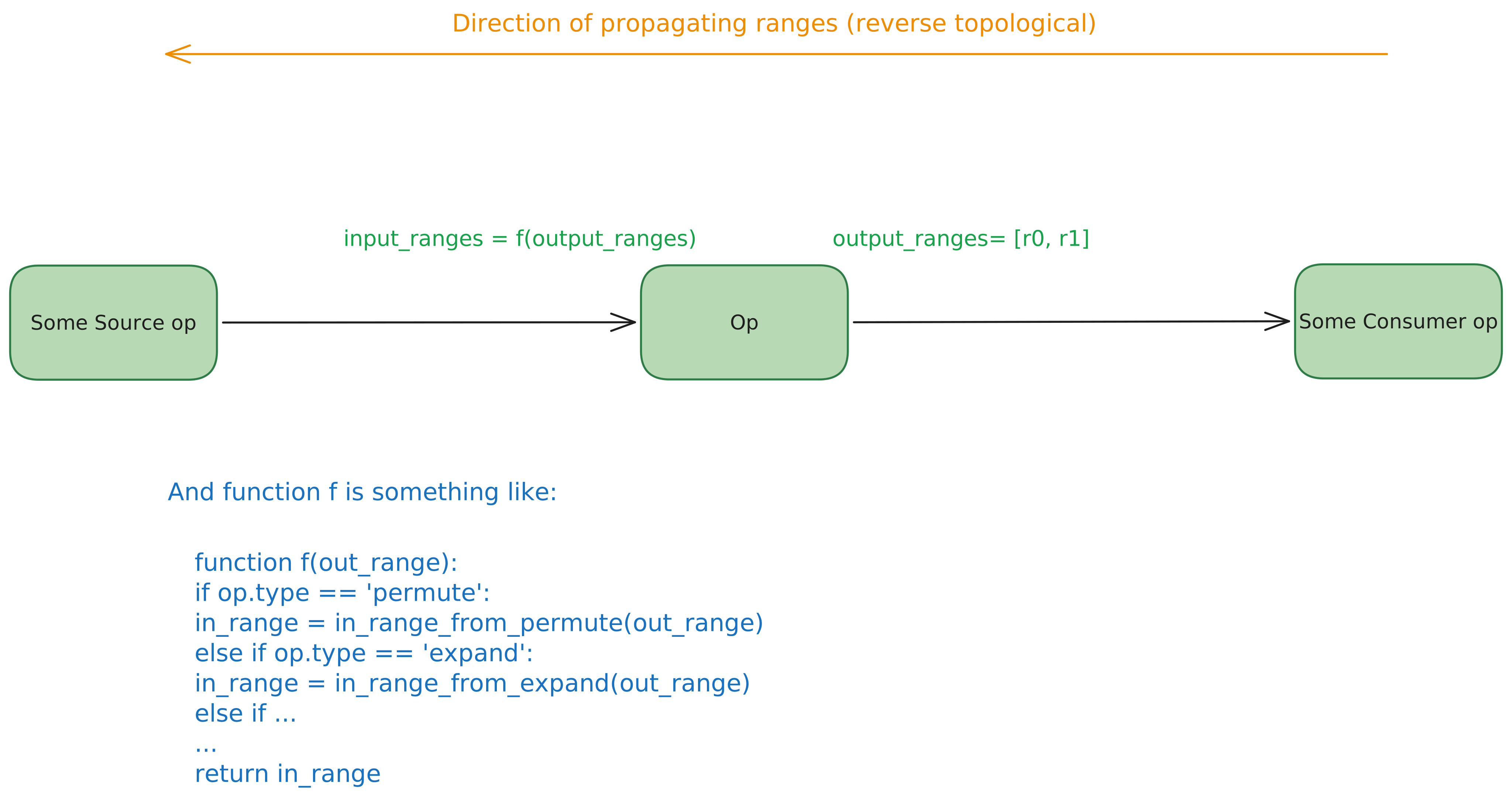
All data movement ops have deterministic rules for propagating ranges. Some of the concrete rules are as follows:
Permute - reorders the range like permute changes shape. if output_range = (R1,R2), permute(0,1) -> input_range = (R2,R1)
Expand - (analogous to repeat in torch) with output_range=(R1, R2), expand(dim=0, R1) expands (1, R2) to (R1, R2) so then input_range = (0, R2)
Shrink - (like slicing) out_range = (R), shrink to (S1, S2) then input_range=(R + S1).
Flip - reverse the tensor. If tensor output_range = (R) then input_range=(N-1-R) where N is the size of tensor
etc. etc.
Now we know how to propagate ranges from outputs of an op to its input. In order to calculate ranges for the whole graph, we still need to figure out how to propagate the consumer op’s output range to its sources’ input ranges.
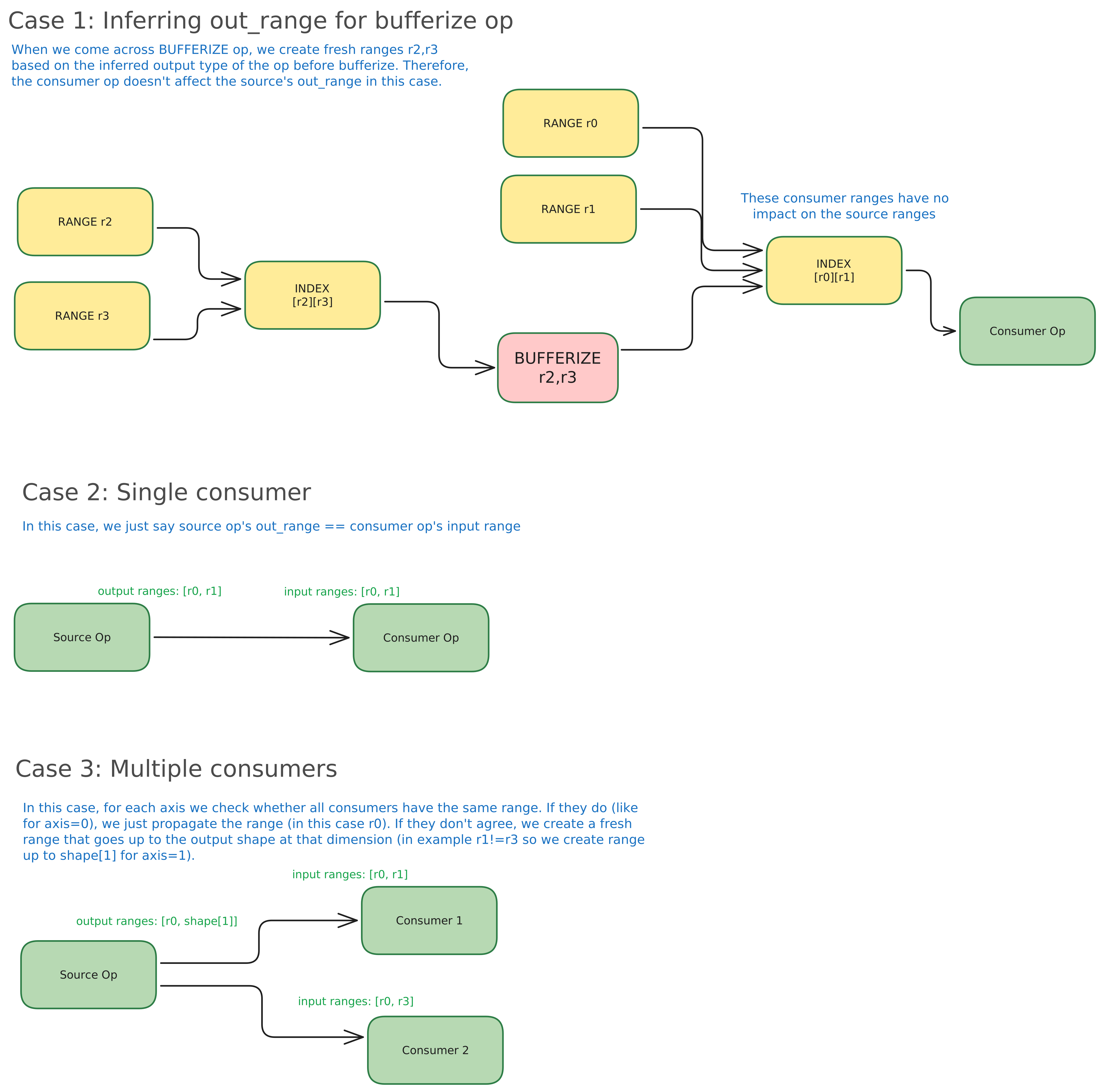
As we see in the image, there are three scenarios:
- If UOp needs to be realized (meaning it is inside the realize map): We create a new range for current UOp’s output range based on that UOp’s shape. UOp’s shape is the UOp property that calculates the shape of the tensor after that UOp.
- If UOp has exactly one consumer: This one is simple, we just propagate the consumer’s input range to the current UOp’s output range.
- If UOp has two or more consumers: This one is a bit tricky. We go through all of the dimensions and see which ranges are same for all of the consumers. Those ranges just get propagated. For a dimension where at least one of the ranges differs, we create a fresh new range that ranges up to the shape at that dimension (
new_range(x.shape[i])). This is called partial realization.
4. Symbolic simplification
This phase does some hardcoded algebraic simplifications. Examples:
x & !x <=> False,x | !x <=> True(x*c1) + (x*c2) <=> x*(c1+c2)(x/x2)/x3 -> x/(x2*x3)
And so on…
5. Buffer removal
Removing buffers is an important phase because each buffer stops fusing operations before it and after into a single kernel. This phase basically decides what will be the fusion boundaries and therefore is required to be very optimized.
A heuristic is used for deciding fusion boundaries and we set a hyperparameter PCONTIG which decides how aggressively you want to fuse.
There are cases where we don’t want to do the most aggressive fusing and the trade-off introduced by fusing is not obvious. When removing buffers, you remove the communication with global memory, but sometimes significantly increase communication in shared memory (Appendix A). The trade-off that appears is not really the fundamental physics constraint, but rather a Tinygrad constraint.
Here is an example. If we pass following sequence
X = Tensor([1.0, 2.0, 3.0, 4.0])
A = X.exp()
B = A + 1
C = A * 2
Tensor.realize(B, C)
The compiler will intially add a buffer to store A. That buffer will later be removed in this phase, and exp(X) will be recomputed to calculate both B and C (image).
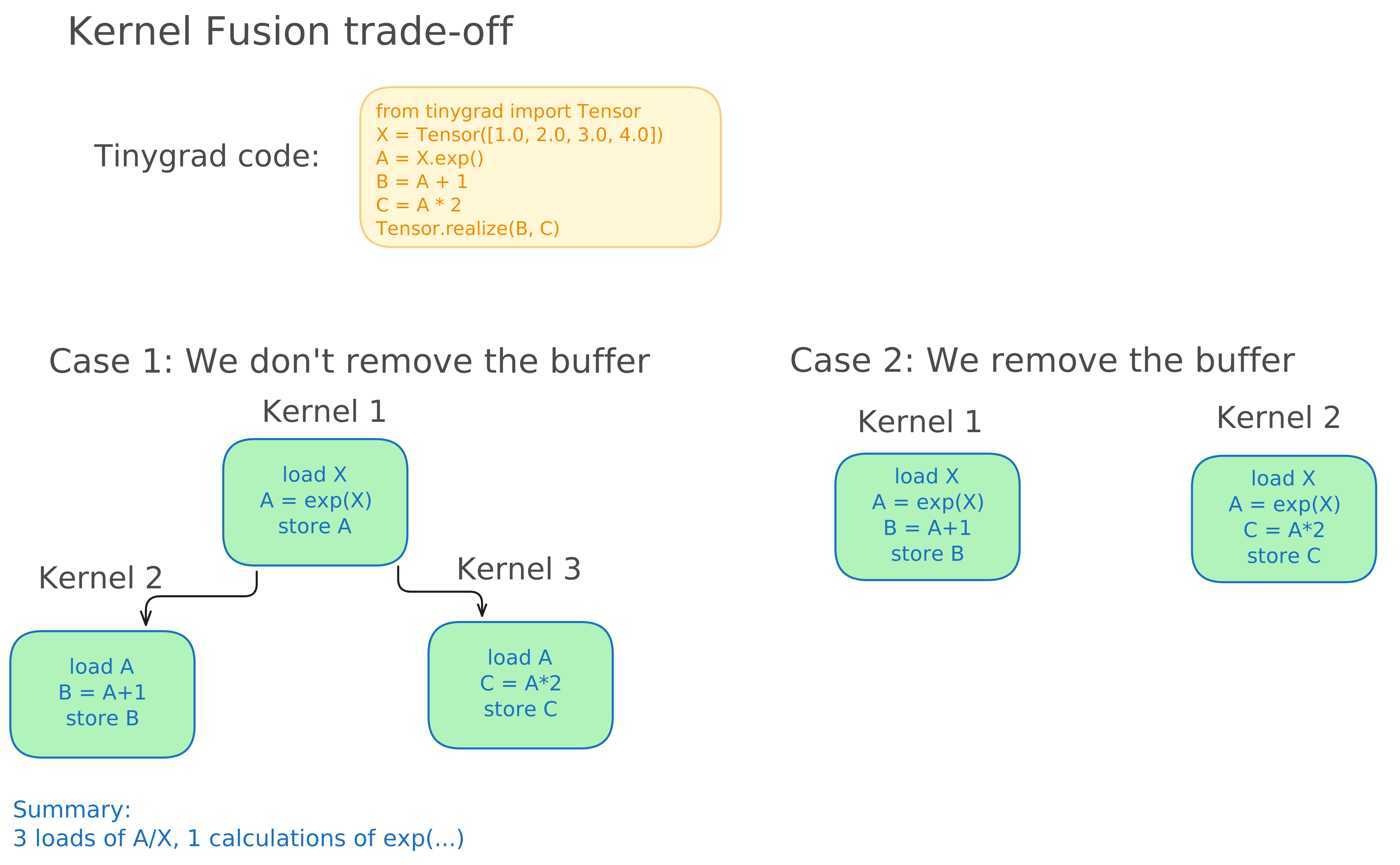
In this case, it is very beneficial to perform one more calculation of exp(...) to avoid doing additional load(A). This might not always be the case if the recomputation is much more expensive than the memory transfer.
Note: You might have noticed that in this particular case, the optimal thing to do would be to merge all the computation in a single kernel which calculates and stores both B and C. It seems that current fusion heuristic in Tinygrad didn’t catch this particular optimization, which would, in fact, move us beyond Pareto frontier.
6. Converting BUFFERIZE ops to concrete buffers
BUFFERIZE ops tell compiler that a buffer in memory should be materialized in that part of the graph. We decompose BUFFERIZE operation to be more explicit about how and when does materialization happen.
BUFFERIZE op is decomposed to a set of:
- BUFFER - represents a pointer to the graph in global memory. Think of this as a declaration of a variable that points to the buffer’s memory.
- RANGE(s) - represents ranges for traversing buffer. We have these from core rangeify phase.
- INDEX - a collection of ranges for a particular buffer.
- STORE - an op that represents an explicit write to memory. Benefit of having this op explicitly is that we can move it around and choose when to perform the write.
- AFTER - an op that is placed after Buffer and store. It is used to note that the data in the buffer is available to use only after it has been stored entirely. A note here: it seems like a compiler constraint to force synchronization here, it seems like adding this op is used for simplifying the handwritten rules later on.
- END - op that represents the end of the RANGE (like closing bracket for a for-loop)
7. Split Kernels
This is a phase where we finally get separate kernels. This phase doesn’t decide the fusion boundaries, it just structures separate kernels. Boundaries were fixed by the buffer removal phase.
Here is the high level of how the kernels are broken up:
Step 1: Detect the STORE operations that have all ranges closed, or an END op after a STORE (those are kernel boundaries, basically stores that are not inside for loops)
Step 2: Each BUFFER becomes a numbered PARAM (essentially an argument to the actual kernel function)
Step 3: Flatten ranges - explicitly reference each range in a store op (store -> ranges 1,2), instead of chaining ranges (store -> range1 -> range2)
Step 4: Remove ops like CONTIGUOUS from the graph, which are used as optimization hints, and store them in per-kernel metadata
Step 5: Gather the ops for each kernel using a Sink Uop. The exceptions are Copy, Buffer_View and Encdec ops. These are data movement ops and are not explicit kernels themselves, they will be handled implicitly later.
Step 6: Add a CALL op that represents the kernel. Its sources are 1. Sink that is the kernel body 2. Kernel arguments 3. Symbolic variables needed at runtime (e.g. batch size)
8. WAR (Write-After-Read) Dependency Insertion
This phase is used to ensure that reads from a buffer aren’t corrupted by following writes. It makes sure that read finishes first, and then a write can occur. Basically like a thread barrier.
9. Building the result map
Just create a mapping from each original UOp (before the rangeify pass) to the respective kernel (Call UOp). This pass concludes the whole rangeify phase.
Creating a schedule
After rangeify phase, we got a DAG with Kernels that will be executed. We apply toposort and get a List of ExecItem objects that is the linear execution order of Kernels, along with metadata and buffers. Each ExecItem contains a Uop that represents it. A term that is commonly used in the Tinygrad repo is also an AST (Abstract Syntax Tree). This is a term inherited from the standard compiler literature, even though these ops technically represent a DAG (meaning that a single op can have multiple outputs so technically it is not a tree).
Memory planning
Memory planning phase focuses on making a precise plan for buffer allocations for each operation in the schedule. This might seem unnecessary at first, as you could just allocate buffers on the go with a malloc-equivalent command for each device and free the buffer after usage. And the truth is - you could do that! But that would take a hit on performance, as memory allocation can be a costly operation. Memory planning in Tinygrad tries to do something smarter.
We can categorize buffers that we work with into two categories:
- Persistent buffers - buffers that will be present during whole runtime (like model weights). These are easy to manage, just pre-allocate their memory statically.
- Intermediate buffers - buffers that come and go (like activations). This is where we apply memory planning
Let’s take a look at the image below.
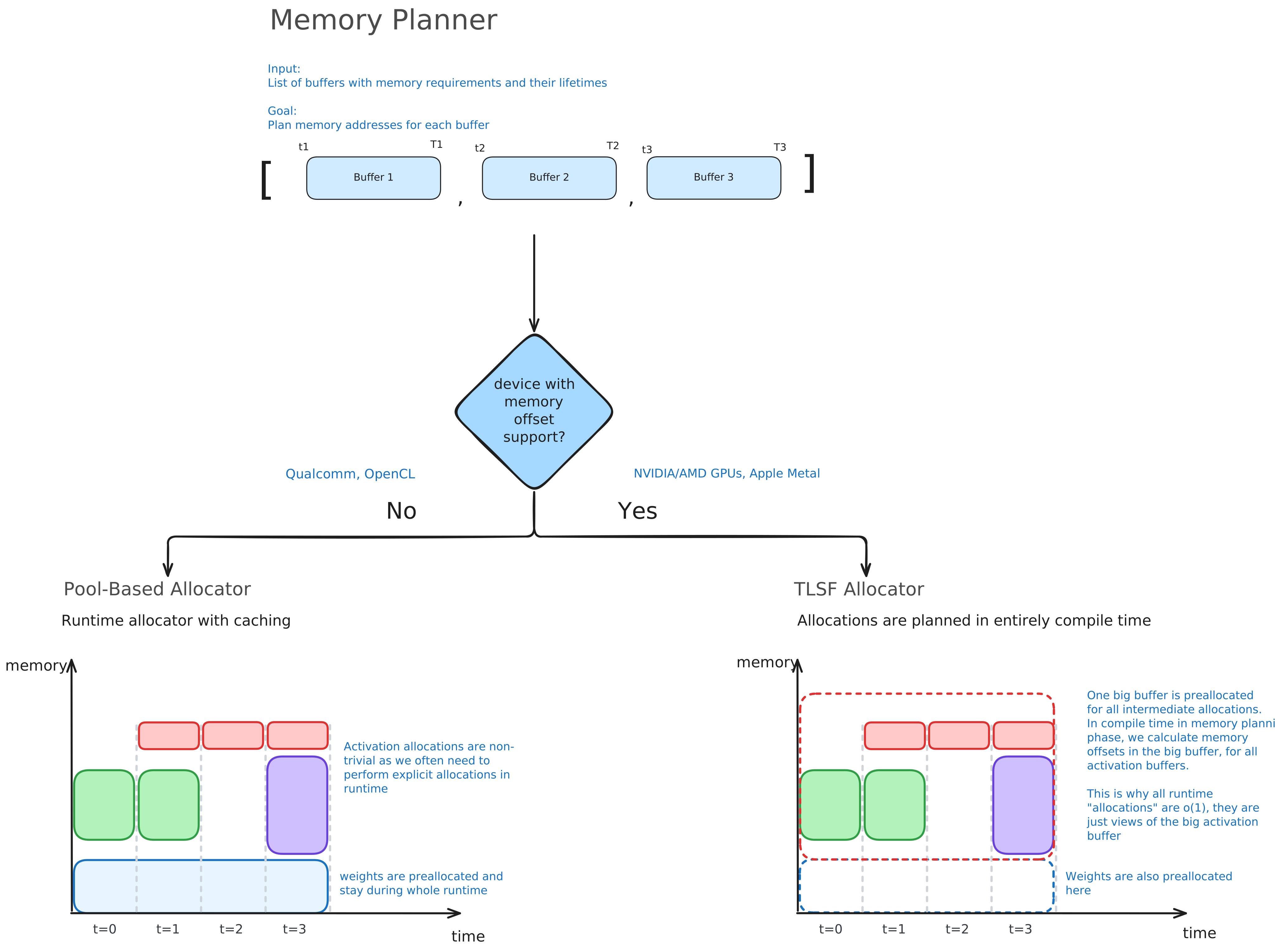
Memory planning starts by taking a list of ExecItems (which is output of rangeify) and calculates for each buffer its lifetime - first and last op that use it in form [ti, Ti]. Then, based on the device we are compiling the model for, we choose which allocator to use. If we use device that supports memory offsets (Nvidia and AMD GPUs, Apple Metal) then we use TLSF Allocator. Otherwise (Qualcomm, OpenCL) we use simple pool-based allocator. Supporting memory offsets means allowing taking a view/slice of the buffer with a certain offset.
TLSF allocator first allocates a big buffer to hold all of the intermediate buffers, essentially avoiding the runtime buffer allocation and treating buffer allocations as just writing to slices of the big buffer. For more details about TLSF allocator look at the Appendix B.
Pool-based allocator treats each intermediate buffer separately. It adds a simple caching layer on top of standard malloc/free allocation/deallocation. When a buffer is set to be deallocated, it is first stored in the buffer cache. If we require another tensor of same size and dtype (and maybe some other params) to be allocated, we can pass it this existing buffer instead and avoid explicit allocation. This might seem like a very unrealistic case, but due to the predictable nature of ML workloads (e.g. N same decoder layers in LLMs) this is a major improvement for performance too.
The output of the Memory Planning phase is the same list of ExecItems where each buffer has assigned memory addresses that it can read from / write to. Actual reads and writes happen at runtime.
Lowering
Lowering phase takes in an ExecItem one by one and generates the CompiledRunner objects with the compiled binary bytes. The former sentence entails two subtle lies.
First one is that each ExecItem produces a CompiledRunner object - that is not the case. Only ExecItems represented by Sink op get compiled, as they represent explicit compute kernels. We will discuss what happens with other ExecItems later.
Second lie is that we always generate a binary as a part of the CompiledRunner. CompiledRunner always has a Python bytes object lib that we treat as a binary. In practice, this can be source code. This depends on the backend compiler being used. If we use e.g. CUDAProgram, it accepts ptx (nvidia virtual assembly) as the input, and similarly NVProgram accepts cubin (cuda binary) as input.
In the Tinygrad overview image we can see all the different phases inside the lowering stage. Different ops take different lowering paths depending on the op types inside the ExecItem object. We take each one of the previously extracted kernels (as per the split-kernel phase) and lower them separately.
As seen in the image, BufferView ops don’t exactly compile. This op just registers another Buffer object in the global buffers dictionary and you can think of this like buffer declaration. Buffer holds a pointer to a particular place in memory where that buffer will be stored during runtime (recall the memory planning phase).
Lowering of the Copy op can take one of two possible paths. If a Copy operation involves host memory, we lower the Copy operation to a BufferCopy operation - a host-intiated host<->device memory transfer.
Otherwise, we lower to BufferXfer which uses peer-to-peer (P2P) direct memory access (DMA) communication. This is host-initated device<->device memory transfer. We copy tensor A from location X to location Y on the same, or between different devices.
Note that Tinygrad does not support device-initiated memory transfers (something like nvshmem).
Thirdly, ExecItem could contain an EncDec op. This operation is Nvidia-backend specific operation which represents video encoding and decoding, like gpu-accelerated ffmpeg operations.
Lastly, we need to handle the lowering of Sink and Program ops. This is the central kernel lowering pipeline which handles compilation of the compute kernels. The end goal of this pipeline is to finalize the kernel compilation and prepare kernel for runtime execution.
Let’s explore step by step what is needed to get there.
Lowering rewrite patterns
There are 21 graph rewrite patterns at the time of writing this that are applied to the UOp DAG at this stage. We will not go through each of them manually, but rather group them by function.
First are the rewrite optimization passes. These include movement op and index op fusion, optimizing gather operation, splitting and merging ranges to improve efficiency, symbolic simplification, constant folding and the beam search.
Beam Search
Beam search is a very important optimization pass in Tinygrad. It does heavy lifting for most of the per-kernel performance. The illustration of Beam Search optimization is shown in the image below.
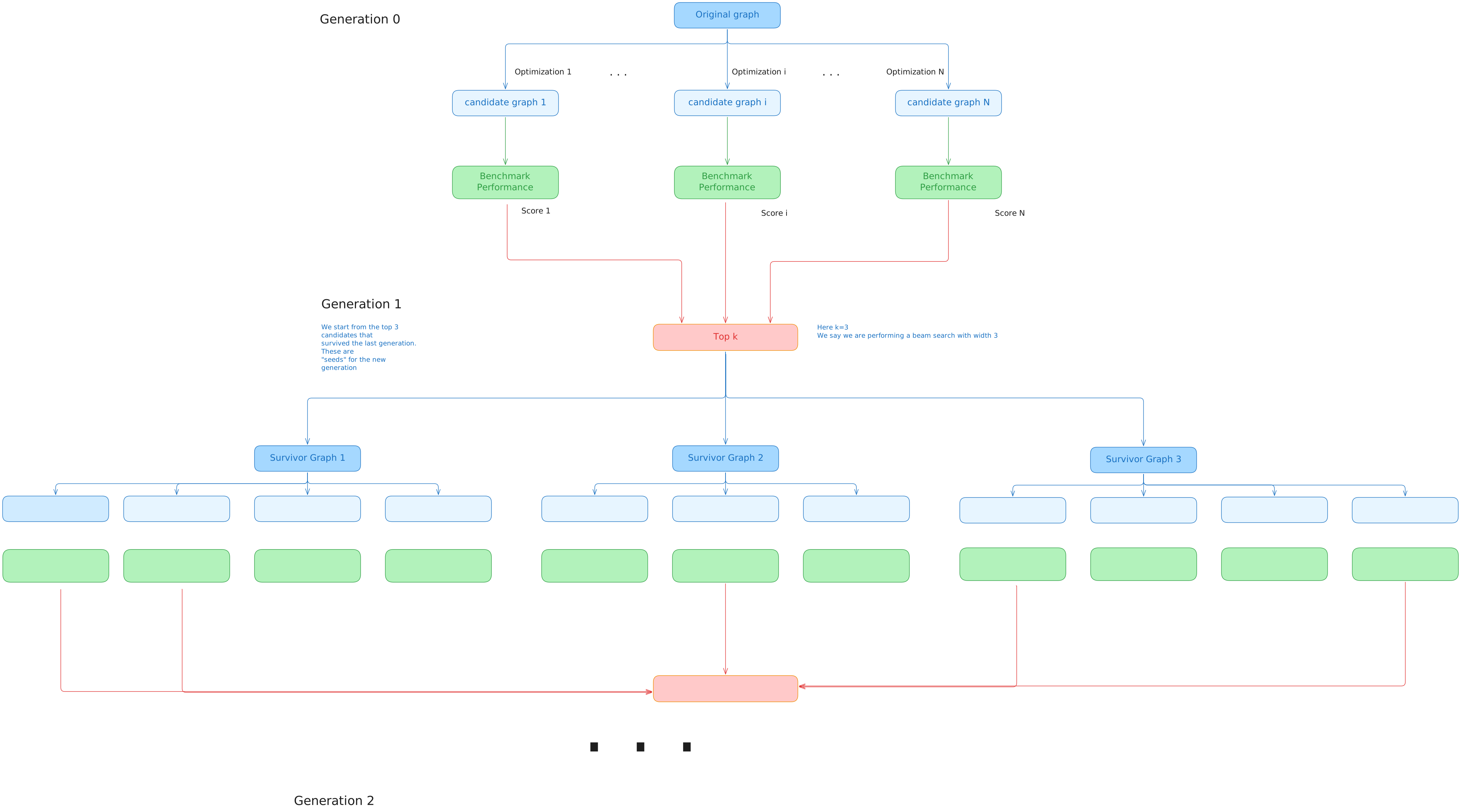
Beam search can perform several types of optimizations on a graph. Instead of guessing which optimizations work best, beam search proposes candidate optimizations and measures performance on each optimization (performance = averaged e2e latency).
The beam search with beam width 3 works like this:
- Start from the original UOp graph and find all possible candidate optimizations (order of magnitude of 100 optimizations).
- Measure all of their performances and find the top 3 graphs from this generation (that is what beam width is for).
- Take all of these 3 graphs as a starting point and apply all possible optimizations to those 3 and keep the total top 3.
- Check the stop conditions - whether we a) reached desired perf b) noticed the convergence of improvements c) max number of steps etc.
There are several types of optimizations that happen in beam search. Those are:
- UPCAST - splitting a range of
Ninto two ranges ofN//4and4. This enables using vectorized load and store PTX instructions. Look at Appendix C for more details. - UNROLL - unrolls a reduce range to remove the loop overhead.
- LOCAL - splits a global range into a global + local range. The analogy in GPUs is to split the work onto blocks and threads per each block. This prepares ground later to add shared memory intermediates that lower the number of detours to gmem.
- GROUP/GROUPTOP - replaces single thread doing sequential reduce with multiple threads doing reduce to intermediate shared memory buffers, which later get reduced into a single buffer. different between GROUP and GROUPTOP lies in
thread idx -> memory addressmappings: do you want adjacent threads to access contiguous memory addresses (GROUP), or do you want contiguous address access inside individual threads (GROUPTOP). GROUP benefits from memory coalescing, while GROUPTOP benefits from cache line prefetching. - TC (Tensor Core) - refactors existing matmul patterns to match the Tensor Core’s expected Tile matmul shapes.
- SWAP - changes which global indices (think blockIdx.x and blockIdx.y) iterate over which buffer dimension. This affects memory access patterns.
- THREAD - analogous to LOCAL but for CPU backend. Instead of having 1 thread operate on range of
N, we haveKthreads operating on ranges of(N//K).
By applying these optimizations in beam-search manner, we get performance optimizations.
Expander
After Beam search, we apply the expander rewrite. The expander essentially does the heavy lifting for what Unroll and Upcast promised to do. It takes in RANGE Uops tagged as Upcast/Unroll ranges and transforms them into actual Unroll UOps. This means that the ranges themselves will be unrolled, as “promised” by Upcast and Unroll optimizations.
Further lowering passes
Following passes continue the lowering process and these passes include:
- Specifying concrete GPU dim mapping (from global/local ranges to concrete blockIdx/threadIdx iterators)
- Adding explicit load and store operations, devectorizing ALU operations on hardware that doesn’t support it (for example ptx doesn’t support add4 vector add operation, so it gets devectorized to 4 individual adds)
- Inferring concrete dtypes for buffers
- Decomposing operations that are not natively supported by given hardware into ones that are
- Approximate specific transcendental functions (exp2, log2, sin, sqrt) that are not natively supported on given hardware.
- additional device specific rewrites
And this concludes the rewrite passes that preceed the linearize phase. At the end of this phase, we completed the necessary device-specific lowerings and have done kernel-level optimizations using beam search. We still have a single UOp DAG for each kernel / ExecItem. Next phase aims to linearize that.
Linearize
The goal of this phase is to go from a DAG to the ordered list of UOps. This could be done by simply applying a topological sort to the DAG to get a semantically correct order of execution. That being said, it is useful to apply additional heuristics to squeeze out more performance. For example, if some calculation doesn’t need to happen inside a for-loop, we should move it outside the loop. Parameter run_count takes care of this, putting ops with smaller run count (outside of the loop) before the ops with higher run count (inside the loop).
Linearize phase does this by applying priority-based toposort. Each op is assigned a tuple (run_count, priority, extra), where run_count is the number of times operation is executed (ranges increase this), priority is defined from a priority table, and extra is used for additional ordering of params (just incremental index).
This forms the sorting criteria - first sort by run_count, then priority and then extra.
The Linearize pass first sorts the UOps based on this tuple in the theoretically most optimal manner. Then, we apply the toposort to inject the producer-consumer dependencies.
This is the priority table for operations with respective reasons for that position.
| Op | Priority | Reason |
|---|---|---|
PARAM |
-20 | Kernel parameters are always first |
DEFINE_VAR |
-19 | Runtime variables |
DEFINE_LOCAL |
-18 | Shared memory declarations |
DEFINE_REG |
-17 | Register/accumulator declarations |
LOAD |
-1 | Place loads early for latency hiding |
| (default) | 0 | A.K.A. ops that burn FLOPS |
STORE |
1 | Place stores late to deload registers |
RANGE |
5 | The less stuff in loop the better |
END |
-5 | Better to end loop early |
And this is basically the whole linearize phase. At the end we have a semantically correct and optimized order of ops ready for rendering.
Rendering
Rendering phase starts with an ordered list of UOps and returns a source code for a given architecture that is ready for compilation.
There are many possible renderers that Tinygrad supports and it has a class hierarchy for organization. Renderer class hierarchy is shown in the image below.
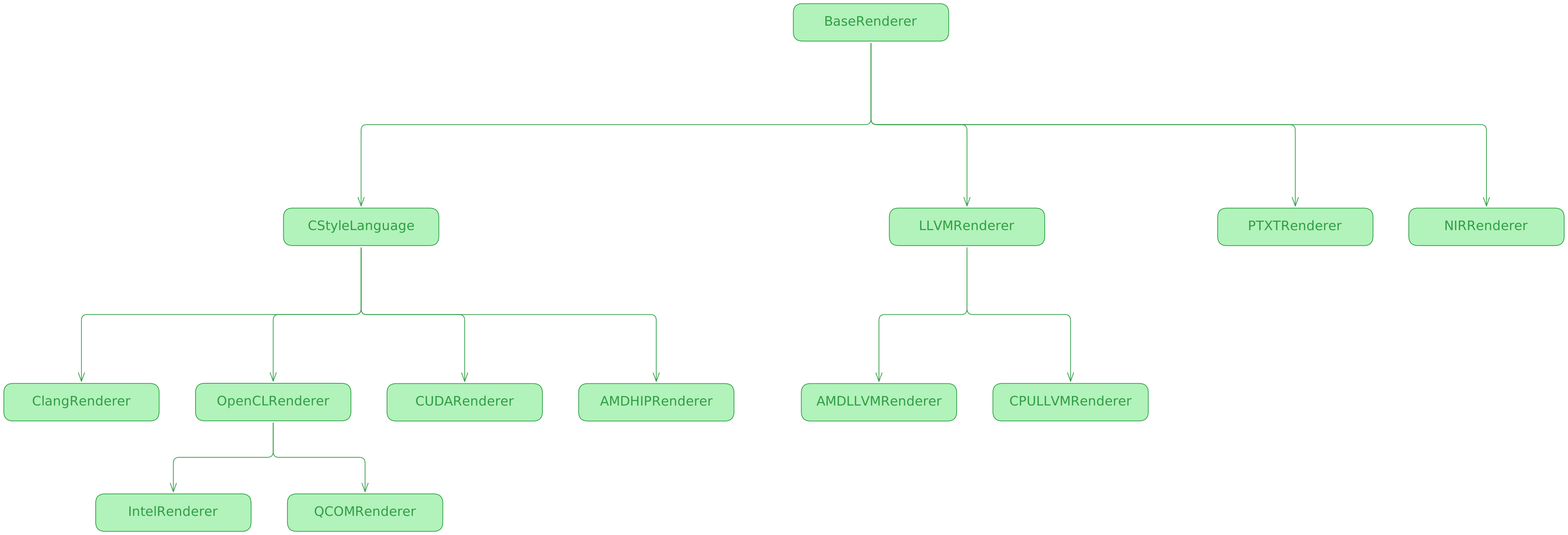
The output of the rendering phase is the single string that represents the source code waiting to be compiled (except for NIRRenderer, which outputs binary IR).
Compilation
After obtaining source code for a kernel from a renderer, the goal is to compile it into a binary that can be executed on chosen device. Each Renderer class that is chosen will own exactly one compiler instance.
This compiler instance will be used to get the respective binary. By default, the Compiler instance’s compile_cached method is used which wraps the compilation with disk based caching of binary (local sqlite db).
This is different from the inital lowering cache in get_runner because this is a persistent cache, while lowering cache is an in-memory dictionary.
The result of this phase is a compiled binary that is ready to be executed by a respective runtime.
This part concludes both the lowering stage as well as the whole process of compilation of the Tinygrad.
The final output of Tinygrad compilation is the list of ExecItem objects where each one either represents an explicit executable compute kernel (CompiledRunner instance) or a data movement operation.
We now have all the pieces necessary to start the program execution.
Runtime
Core of the execution pipeline is a simple while loop. By removing surrounding debugging, validation and JIT capturing code, it looks like this:
while len(schedule):
    ei = schedule.pop(0).lower()
    ei.run(var_vals)
We iteratively pop scheduled ExecItems, we lower them if needed. If we already lowered that combination of the kernel, we just load it from cache and this lower() method is instant.
Inside the run method several steps are done:
- Merge schedule-level variables (e.g. passing concrete value for symbolic batch size) with ExecItem’s specific fixed variables (e.g. the index of the current device)
- Allocate buffers - if we are using TLSF Allocator, this boils down to working with views of the global intermediates buffer (recall Memory Planning section). If we are using Pool-based allocator, we need explicit device allocation invocations.
- Running the actual scheduled item. If we are working with compute kernel (CompiledRunner), we launch a kernel and run the binary on device. If we are performing copy, we perform the explicit copies to/from disk. If we are doing BufferXfer, then we add the transfer command to the Tinygrad’s command queue for DMA which is often handled by a dedicated hardware component on device for handling DMA.
And that is basically the whole runtime. There is one more possible optimization that can be done to further optimize the repeated execution of the same model/function and that is TinyJIT.
TinyJIT
TinyJIT is the highest level caching mechanism available in Tinygrad. It works by first wrapping a function (normally your ML model forward) with TinyJIT decorator, something like this:
 @TinyJit
  def f(x):
    # f is a model forward function
    a = x + 1
    b = a * 2
    c = b.sum()
    return c.realize()
Upon wrapping this code, the model compilation and execution goes through a different route. First two calls of the function f are different:
- First call - perform the compilation and execution normally, go through all the phases as noted in this blog. This is to fill the runner cache and optionally perform beam search to find optimized kernel variations.
- Second call - uses those cached ExecItems and during runtime captures the scheduled ExecItems. Now we have successfully cached both the schedule of the ExecItems, as well as their binaries.
- Later calls - we just load the previously captured schedule and execute it with new inputs. This saves us from performing scheduling every time we get new inputs.
Think of TinyJIT as a layer on top of the runner cache that caches the scheduling too. It is useful whenever we plan to use the same model multiple times (in both training and inference).
This section concludes the architectural discussion about Tinygrad. The next section will be a far more subjective outlook on Tinygrad.
Personal Thoughts on Tinygrad
This is the final part of the blog where I discuss some interesting trade-offs that Tinygrad has made along the way, some things I think they did great and some things I think they could do better.
-
Tinygrad essentially has one IR composed of UOp operations. This is an interesting trade-off. It seems like this decision simplifies code writing, as your graph rewriters always return an UOp graph and you can use graph rewriting engine for basically anything in the compiler. However, I believe it makes it harder to generalize Tinygrad to architectures that diverge from GPUs. Tinygrad UOp opset contains many hardware-specific ops: RANGE, BARRIER, etc. For example, BARRIER is used for synchronizing threads, a concept specific to GPUs which many accelerators are aborting.
-
They can target Nvidia PTX directly! To the best of my knowledge, no other general-purpose AI compiler can do this. This gives them a potentially higher ceilling for squeezing out the best GPU performance.
-
Tinygrad claims to have “the best execution speed of any framework because it usually bypasses the GPU driver and prebuilds the command queue”. This is a very bold claim and if it is true, it is another reason to use Tinygrad for GPU inference workloads.
-
Memory planning seems pretty good. TLSF is as good as it gets in terms of speed (since we basically don’t perform alloc/dealloc in runtime) and seems reasonably good in terms of memory fragmentations.
-
I think their way of performing kernel fusion might be too complex. Their fusion is defined as an absence of bufferize ops which are points to synchronize the code. This is problematic as you are adding plenty new ops that are used for handling this kind of behavior, which are helper ops. This is a separate layer of complexity. As seen in examples above, compiler fails to exploit all fusing options because of complexity.
-
I am also skeptical about are ranges. There is a whole pass focusing on ranges (rangeify) and you have separate ops to close and open ranges. This strengthens the argument that Tinygrad has overfit to GPU-like architecture to a degree.
-
AFAIK, there is no option to perform device-initiated memory transfers. This becomes more and more important when we consider both model training and inference of large models on multiple devices. This could be used to decrease the overhead of synchronization ops like
AllReduce, AllGather, Scatter, AllToAll.
To summarize, I believe Tinygrad is very well positioned to tackle any GPU-like architecture for performant inference workloads. With regards to other AI accelerators, I think there is nontrivial work to be done in rethinking the Tinygrad and generalizing it to more heterogeneous architectures. Nonetheless, I am very optimistic about Tinygrad’s future.
Appendix A - Bufferize removal example
When trying to remove a bufferize op that has one of the sources as a reduce op, that is often not desired, because of the added memory reads from shared memory. Here is an example: Imagine a scenario like this:
a = Tensor.randn(2, 3)
b = Tensor.randn(3)
result = (a.sum(axis=0) + b).sum()  # reduce (2,3)→(3,), add, reduce (3,)→()
Tensor.realize(result)
From here, if we had a bufferize op, the generated kernels pseudo code would be something like this:
# Kernel 1 - calculate the reduce
for r1 in range(N):
    acc = 0
    for r0 in range(M):
        acc += a[r0, r1]
    tmp[r1] = acc # N writes to global

# Kernel 2
  acc = 0
  for r1 in range(N):
      acc += tmp[r1] + b[r1] # N reads from global
  result = acc
And if there were no bufferize op
  acc = 0
  for r1 in range(N):
      # inlined inner reduce — re-runs for EACH r1
      inner_acc = 0
      for r0 in range(M):
          inner_acc += a[r0, r1] # MN reads from shared memory
      acc += inner_acc + b[r1]
  result = acc
Therefore, if MN reads from shared memory is greater than N reads and N writes to global, then removing the buffer is negative. An important note here is that both of these implementations are inefficient. If we wanted to create an efficient kernel, we would “merge” the kernels 1 and 2 from the first variation and store tmp in shared memory. This is a constraint of the compiler that we need to choose between these two.
Appendix B - TLSF Memory Allocator
This section explains the Two-Level Segregated Fit (TLSF) memory allocator that is used in Tinygrad for managing device memory. TLSF aims to achieve several requirements: 1. have bounded and fast allocation/deallocation time. 2. low fragmentation.
It achieves O(1) allocation and deallocation.
There is one important difference introduced in the Tinygrad’s TLSF implementation. Original TLSF allocator performs all of the allocations in runtime and tries to bound the allocation time as well as fragmentation. However, inside Tinygrad memory planning phase, we just simulate the allocator in compile time.
Why? Well, if we are using TLSF Allocator, that means we are using a device that can perform memory offsets and we plan to allocate one big buffer for all of the intermediates. That means that by design all of the “allocations”, which are just offsets to the big buffer, are O(1).
So how is TLSF allocator actually used? We use it on the CPU to simulate the device execution. Even though we use a big buffer where allocations are O(1), we still want to minimize fragmentation. That is why TLSF algorithm is important.
We may now proceed to the actual algorithm. Process of allocating a block of memory is shown in the image.
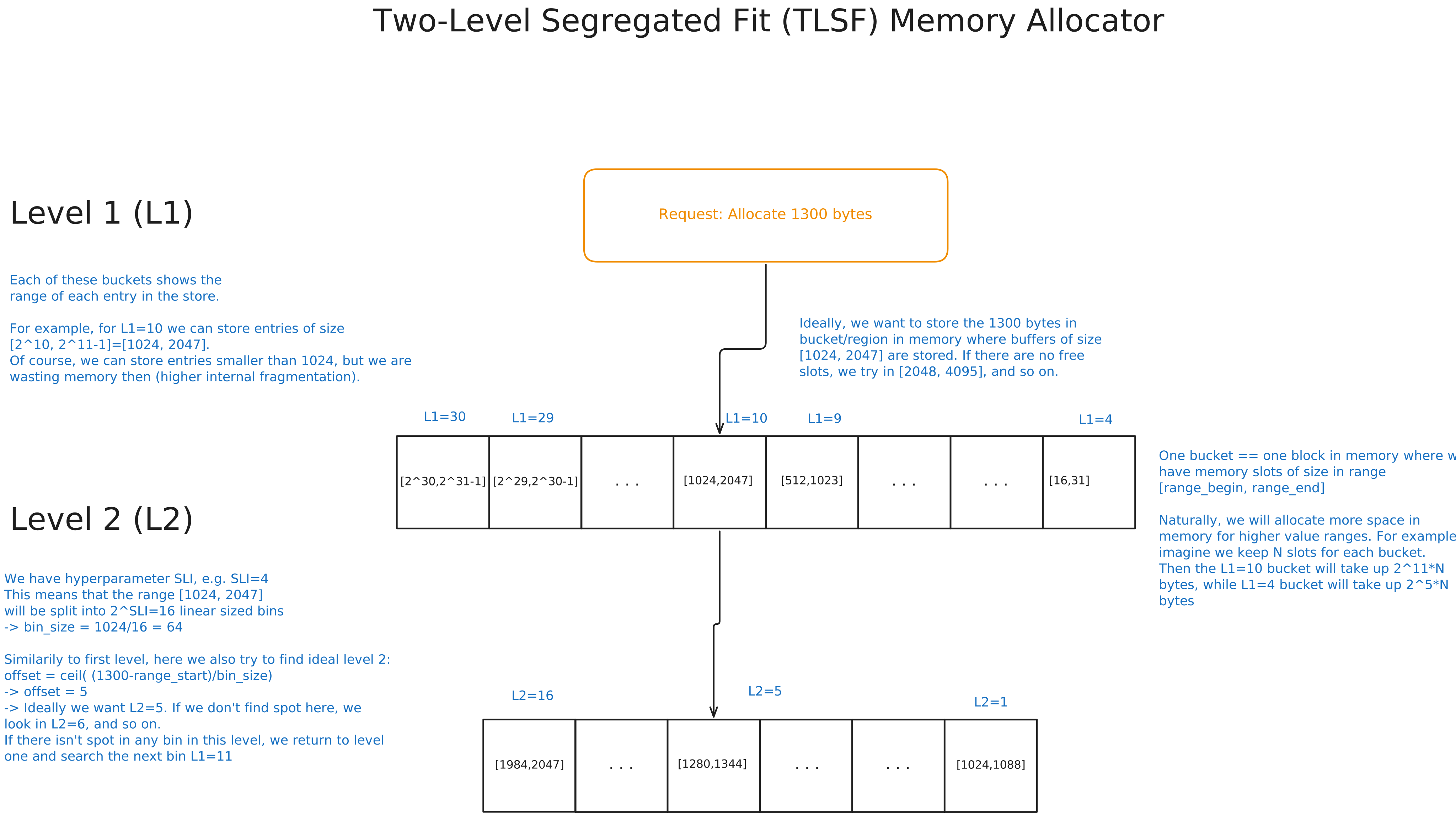
TLSF allocator in Tinygrad works by first allocating one big buffer that is used for all intermediate buffers. This way, we only ever perform one allocation per graph, at the beginning. Job of the TLSF Allocator is to compactly fit buffers in the intermediate memory.
Allocator is separated into two levels. First level L1 is used to determine the high-level range of values that we want to allocate. If we want to allocate 1300 bytes, the ideal range is [1024, 2047], meaning L1=10. We use bitmasks where each bit tells us whether that range is full or not. Using bitmask, we check what is the lowest free range that can hold 1300 bytes and go with that range. In this example, we assume there is space in range [1024, 2047] to store 1300 bytes.
In the next step, we go to level 2. We have a configurable parameter SLI, which determines the number of bins we divide the current range in. In this example SLI=4 so we divide range [1024, 2047] into 16 bins of size 64. We check what bin our 1300 bytes fall into.
We calculate offset = ceil((1300-1024)/64) = 5. We use a similar bitmask approach to find the smallest free L2 block. If L2=5 is free, we allocate that. Otherwise, we find the smallest free block that can fit. If there are none in the whole range, we go look in L1=11, and so on, until we find a valid space.
Appendix C - Vectorized loads with UPCAST
This section justifies the utility of UPCAST transformation in Beam search. Look at the image below.
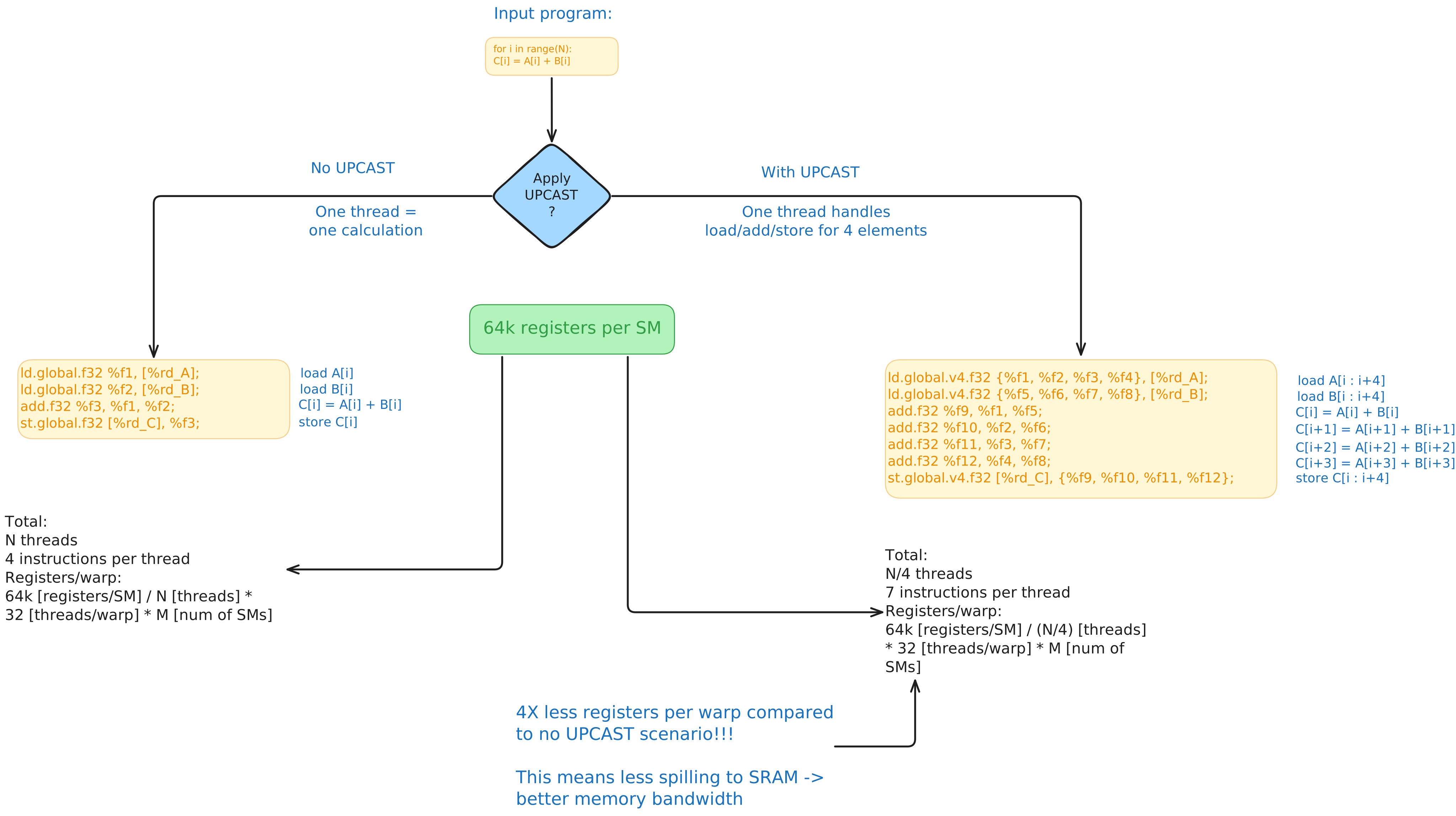
As seen in the image, Upcast operation splits a single range of length N into two ranges of length N//4 and 4. The number for is chosen specifically because of the existence of PTX vectorized load 4 instruction. This instruction loads 4 scalars contiguous in memory as a single function. This allows us to decrease the number of threads from N to N//4, where each thread loads and stores 4 scalars and performs operation on it (in this case, elementwise addition). It is not obvious how this optimization helps, since the total number of bytes that need to be loaded and stored stays the same, and therefore the memory throughput. Additionally, a contrary case could be made for this optimization because it decreases the overall number of warps, which can limit the capability of SMs to hide latency during stalls.
The core benefit of this optimization lies in the fact that we get 4X more registers per each warp/thread. This means that when we can store more operands for a given operation directly in memory, avoiding the trips to SRAM. On hopper architecture, registers have peak memory bandwidth of ~292 TB/s, while peak SRAM bandwidth is ~33 TB/s, an order of magnitude lower.